Coming Soon Shortly "www.weontechnologies.com"
Wednesday, 29 August 2018

Monday, 18 September 2017
Database Concepts
Introduction to Database Concepts
In the free online course Introduction to Database Concepts you will learn about the structure of a database, and how to establish relationships within your database. You will learn about the objects and data that make up a database, and the ways to create databases to store data.The course begins by introducing you to the core concepts of databases. You will learn about applications for performing tasks and interacting with a database. Next, you will be introduced to concepts that you need to understand to be able to construct a database. You will learn about the normalization process of organizing data in a database, and the constraints that make data consistent and unique when required. You will learn about referential integrity and how constraints are a fundamental part of it.
Finally, you will be introduced to objects that make up a database and the various datatypes you can store within a database. You will learn about creating, altering and deleting databases using the Data Definition Language.
Wednesday, 14 September 2016
Following are few of the important output devices which are used in a computer.
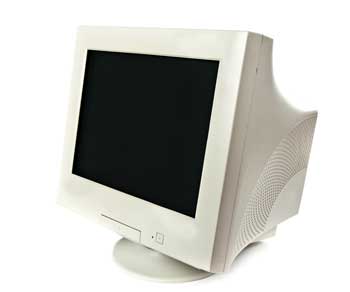
There are two kinds of viewing screen used for monitors.
A finite number of characters can be displayed on a screen at once. The screen can be divided into a series of character boxes - fixed location on the screen where a standard character can be placed. Most screens are capable of displaying 80 characters of data horizontally and 25 lines vertically. There are some disadvantages of CRT:
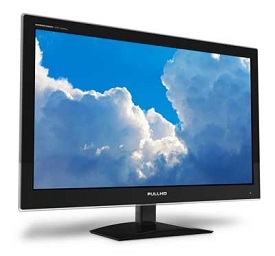
The flat-panel display is divided into two categories:
There are two types of printers:
Characteristics of Impact Printers are the following:
These are further divided into two types:
Advantages
Advantages
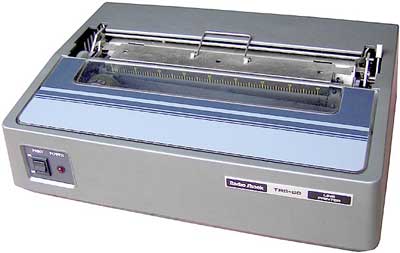 These are of further two types
Advantages
Advantages
These printers are of two types
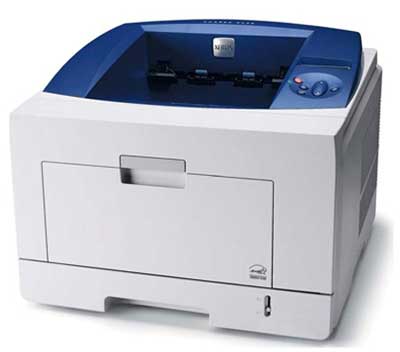
They make less noise because no hammering is done and these have many styles of printing modes available. Colour printing is also possible. Some models of Inkjet printers can produce multiple copies of printing also.
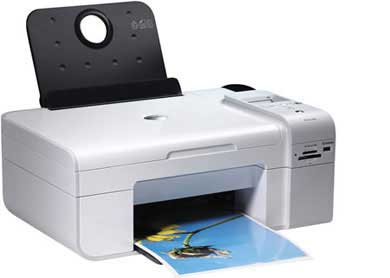
- Monitors
- Graphic Plotter
- Printer
Monitors
Monitors, commonly called as Visual Display Unit (VDU), are the main output device of a computer. It forms images from tiny dots, called pixels that are arranged in a rectangular form. The sharpness of the image depends upon the number of pixels.There are two kinds of viewing screen used for monitors.
- Cathode-Ray Tube (CRT)
- Flat- Panel Display
Cathode-Ray Tube (CRT) Monitor
The CRT display is made up of small picture elements called pixels. The smaller the pixels, the better the image clarity, or resolution. It takes more than one illuminated pixel to form whole character, such as the letter ‘e’ in the word help.A finite number of characters can be displayed on a screen at once. The screen can be divided into a series of character boxes - fixed location on the screen where a standard character can be placed. Most screens are capable of displaying 80 characters of data horizontally and 25 lines vertically. There are some disadvantages of CRT:
- Large in Size
- High power consumption
Flat-Panel Display Monitor
The flat-panel display refers to a class of video devices that have reduced volume, weight and power requirement in comparison to the CRT. You can hang them on walls or wear them on your wrists. Current uses of flat-panel displays include calculators, video games, monitors, laptop computer, graphics display.The flat-panel display is divided into two categories:
- Emissive Displays - The emissive displays are devices that convert electrical energy into light. Example are plasma panel and LED(Light-Emitting Diodes).
- Non-Emissive Displays - The Non-emissive displays use optical effects to convert sunlight or light from some other source into graphics patterns. Example is LCD(Liquid-Crystal Device)
Printers
Printer is an output device, which is used to print information on paper.There are two types of printers:
- Impact Printers
- Non-Impact Printers
Impact Printers
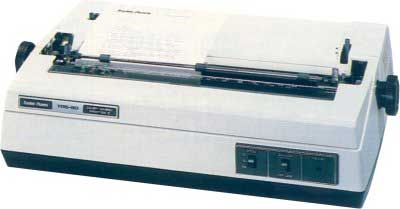
The impact printers print the characters by striking them on the ribbon which is then pressed on the paper.Characteristics of Impact Printers are the following:
- Very low consumable costs
- Very noisy
- Useful for bulk printing due to low cost
- There is physical contact with the paper to produce an image
- Character printers
- Line printers
Character Printers
Character printers are the printers which print one character at a time.These are further divided into two types:
- Dot Matrix Printer(DMP)
- Daisy Wheel
Dot Matrix Printer
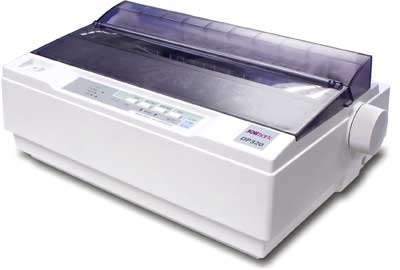
In the market one of the most popular printers is Dot Matrix Printer. These printers are popular because of their ease of printing and economical price. Each character printed is in form of pattern of dots and head consists of a Matrix of Pins of size (5*7, 7*9, 9*7 or 9*9) which come out to form a character that is why it is called Dot Matrix Printer.Advantages
- Inexpensive
- Widely Used
- Other language characters can be printed
- Slow Speed
- Poor Quality
Daisy Wheel
Head is lying on a wheel and pins corresponding to characters are like petals of Daisy (flower name) that is why it is called Daisy Wheel Printer. These printers are generally used for word-processing in offices which require a few letters to be sent here and there with very nice quality.Advantages
- More reliable than DMP
- Better quality
- The fonts of character can be easily changed
- Slower than DMP
- Noisy
- More expensive than DMP
Line Printers
Line printers are the printers which print one line at a time.
These are of further two types- Drum Printer
- Chain Printer
Drum Printer
This printer is like a drum in shape so it is called drum printer. The surface of drum is divided into number of tracks. Total tracks are equal to size of paper i.e. for a paper width of 132 characters, drum will have 132 tracks. A character set is embossed on track. The different character sets available in the market are 48 character set, 64 and 96 characters set. One rotation of drum prints one line. Drum printers are fast in speed and can print 300 to 2000 lines per minute.Advantages
- Very high speed
- Very expensive
- Characters fonts cannot be changed
Chain Printer
In this printer, chain of character sets are used so it is called Chain Printer. A standard character set may have 48, 64, or 96 characters.Advantages
- Character fonts can easily be changed.
- Different languages can be used with the same printer.
- Noisy
Non-impact Printers
Non-impact printers print the characters without using ribbon. These printers print a complete page at a time so they are also called as Page Printers.These printers are of two types
- Laser Printers
- Inkjet Printers
Characteristics of Non-impact Printers
- Faster than impact printers.
- They are not noisy.
- High quality.
- Support many fonts and different character size.
Laser Printers
These are non-impact page printers. They use laser lights to produce the dots needed to form the characters to be printed on a page.Advantages
- Very high speed
- Very high quality output
- Give good graphics quality
- Support many fonts and different character size
Disadvantages
- Expensive.
- Cannot be used to produce multiple copies of a document in a single printing.
Inkjet Printers
Inkjet printers are non-impact character printers based on a relatively new technology. They print characters by spraying small drops of ink onto paper. Inkjet printers produce high quality output with presentable features.They make less noise because no hammering is done and these have many styles of printing modes available. Colour printing is also possible. Some models of Inkjet printers can produce multiple copies of printing also.
Advantages
- High quality printing
- More reliable
Disadvantages
- Expensive as cost per page is high
- Slow as compared to laser printer
Following are few of the important input devices which are used in a computer:
Keyboards are of two sizes 84 keys or 101/102 keys, but now keyboards with 104 keys or 108 keys are also available for Windows and Internet.
The keys on the keyboard are as follows:
- Keyboard
- Mouse
- Joy Stick
- Light pen
- Track Ball
- Scanner
- Graphic Tablet
- Microphone
- Magnetic Ink Card Reader(MICR)
- Optical Character Reader(OCR)
- Bar Code Reader
- Optical Mark Reader(OMR)
Keyboard
Keyboard is the most common and very popular input device which helps in inputting data to the computer. The layout of the keyboard is like that of traditional typewriter, although there are some additional keys provided for performing additional functions.Keyboards are of two sizes 84 keys or 101/102 keys, but now keyboards with 104 keys or 108 keys are also available for Windows and Internet.
The keys on the keyboard are as follows:
| Sr.No | Keys | Description |
|---|---|---|
| 1 | Typing Keys | These keys include the letter keys (A-Z) and digit keys (0-9) which generally give same layout as that of typewriters. |
| 2 | Numeric Keypad | It is used to enter numeric data or cursor movement. Generally, it consists of a set of 17 keys that are laid out in the same configuration used by most adding machines and calculators. |
| 3 | Function Keys | The twelve function keys are present on the keyboard which are arranged in a row at the top of the keyboard. Each function key has unique meaning and is used for some specific purpose. |
| 4 | Control keys | These keys provide cursor and screen control. It includes four directional arrow keys. Control keys also include Home, End, Insert, Delete, Page Up, Page Down, Control(Ctrl), Alternate(Alt), Escape(Esc). |
| 5 | Special Purpose Keys | Keyboard also contains some special purpose keys such as Enter, Shift, Caps Lock, Num Lock, Space bar, Tab, and Print Screen. |
Functionalities of a computer
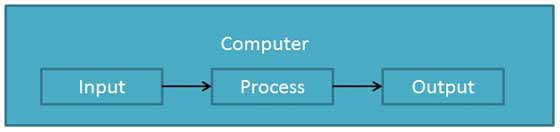
Any digital computer carries out five functions in gross terms:- Takes data as input.
- Stores the data/instructions in its memory and use them when required.
- Processes the data and converts it into useful information.
- Generates the output
- Controls all the above four steps.
Definition
Computer is an electronic data processing device which- accepts and stores data input,
- processes the data input, and
- generates the output in a required format.
Advantages
High Speed
- Computer is a very fast device.
- It is capable of performing calculation of very large amount of data.
- The computer has units of speed in microsecond, nanosecond, and even the picosecond.
- It can perform millions of calculations in a few seconds as compared to man who will spend many months for doing the same task.
Accuracy
- In addition to being very fast, computers are very accurate.
- The calculations are 100% error free.
- Computers perform all jobs with 100% accuracy provided that correct input has been given.
Storage Capability
- Memory is a very important characteristic of computers.
- A computer has much more storage capacity than human beings.
- It can store large amount of data.
- It can store any type of data such as images, videos, text, audio and many others.
Diligence
- Unlike human beings, a computer is free from monotony, tiredness and lack of concentration.
- It can work continuously without any error and boredom.
- It can do repeated work with same speed and accuracy.
Versatility
- A computer is a very versatile machine.
- A computer is very flexible in performing the jobs to be done.
- This machine can be used to solve the problems related to various fields.
- At one instance, it may be solving a complex scientific problem and the very next moment it may be playing a card game.
Reliability
- A computer is a reliable machine.
- Modern electronic components have long lives.
- Computers are designed to make maintenance easy.
Automation
- Computer is an automatic machine.
- Automation means ability to perform the given task automatically.
- Once a program is given to computer i.e., stored in computer memory, the program and instruction can control the program execution without human interaction.
Reduction in Paper Work
- The use of computers for data processing in an organization leads to reduction in paper work and results in speeding up a process.
- As data in electronic files can be retrieved as and when required, the problem of maintenance of large number of paper files gets reduced.
Reduction in Cost
- Though the initial investment for installing a computer is high
but it substantially reduces the cost of each of its transaction.
Disadvantages
No I.Q
- A computer is a machine that has no intelligence to perform any task.
- Each instruction has to be given to computer.
- A computer cannot take any decision on its own.
Dependency
- It functions as per a user’s instruction, so it is fully dependent on human being
Environment
- The operating environment of computer should be dust free and suitable.
No Feeling
- Computers have no feelings or emotions.
- It cannot make judgement based on feeling, taste, experience, and knowledge unlike a human being.
Computer Tutorial
Full Form of Computer
COMMON OPERATING MACHINE PARTICULARLY USED FOR TRADE, EDUCATION AND RESEARCH.Technically speaking, the term computer doesn't have a full form. The Computer is essentially derived from the word 'compute' which basically means 'calculate'.
COMMON OPERATING MACHINE PARTICULARLY USED FOR TRADE, EDUCATION AND RESEARCH.Technically speaking, the term computer doesn't have a full form. The Computer is essentially derived from the word 'compute' which basically means 'calculate'.
Subscribe to:
Comments (Atom)